
Live Menu
Menu boards your staff update from an iPad - mark a special sold out and every screen shows it within seconds.
Build the menu
Open the
Live Menutab. Add sections (e.g. Tonight's Specials, From the Grill), then+ Itemfor each dish: name, price, a short description and tags like GF or V.Put it on a screen
In a design,
+ Add Element→Live Menu. Tick the sections to show, choose 1-3 columns and how sold-out items look: crossed out with a SOLD OUT tag, faded, or hidden. Set separate sizes for items, headings, descriptions and prices, fonts, and the heading position (Left, Centre or Right). Save, add the design to a playlist, Push.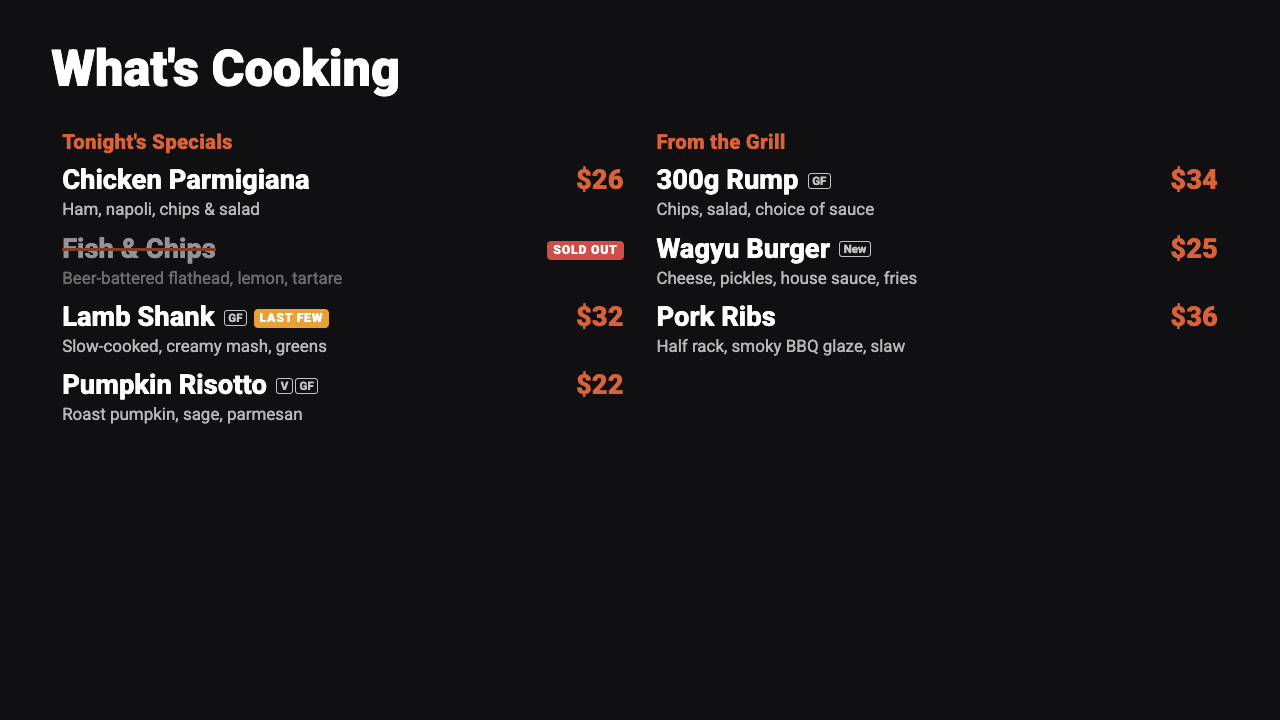
A Live Menu board on screen. Set the staff PIN
Under
Staff access, save a 4-digit PIN. Staff can only change whether something's available - never prices or items.Set up the iPad
Scan the QR code on the Live Menu tab (or open the link under it), then Share →
Add to Home Screenso it opens like an app. Enter the PIN and your first name once.Mark items during service
Each item has three big buttons:
Available,Last fewandSold out. Tap one and every menu board updates within a couple of seconds.Let it reset itself
Every day at the
Daily resettime (5:00am by default) everything goes back to available.Recent changeson the Live Menu tab shows who changed what, and when.