
Show Mode
For nights where something needs to change on the fly.
Open Show Remote
The sidebar's
Show Remote ↗link opens/showin a new tab (only visible if this venue has it turned on).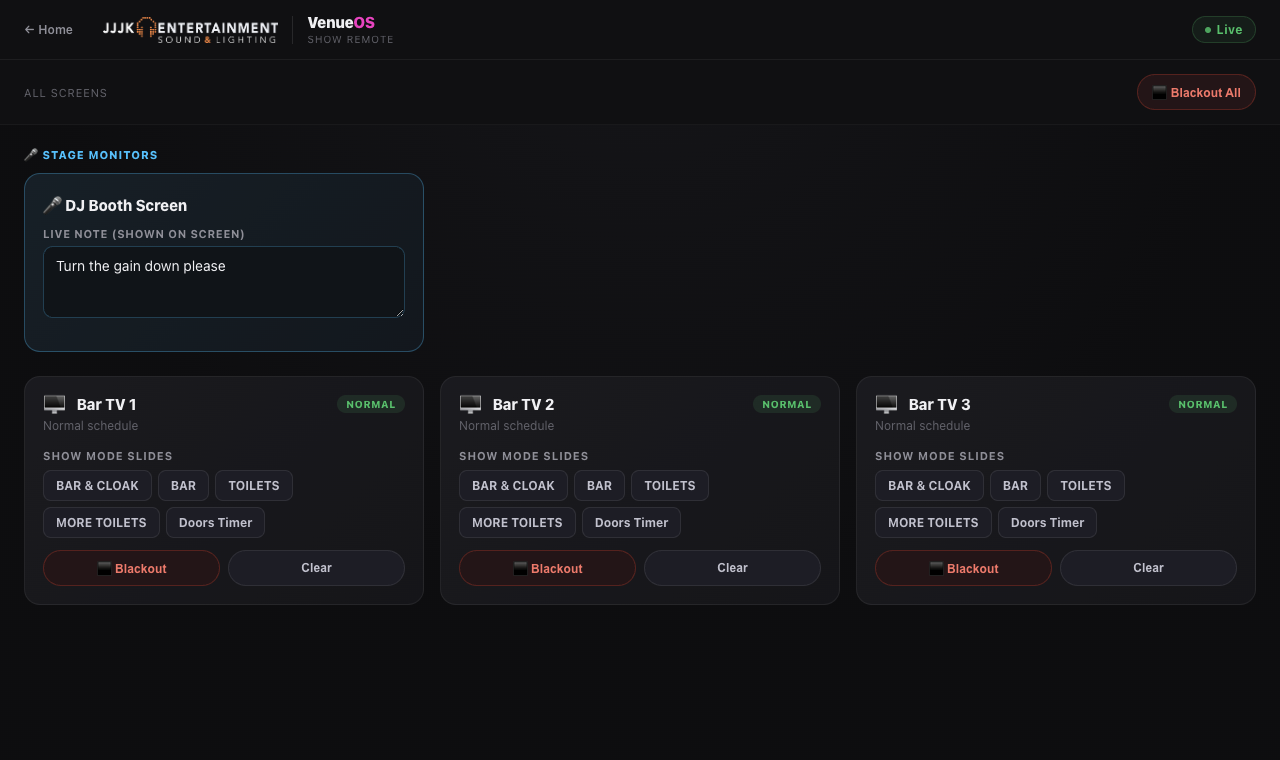
Show Remote: one card per screen, blackout and slide buttons. PIN if set
Some venues gate it with a 4-digit PIN so any tech on the night can jump in from their own phone without a full login.
Blackout a screen
Each paired screen has its own
Blackoutbutton;Clearbrings back whatever was showing before the blackout.Blackout everything at once
The master button blacks out every paired screen in one tap, and turns into "Blackout Active — Tap to Clear" until you undo it.
Jump to a specific slide
Any slide saved in a Media folder named exactly "Show Mode" shows up as a one-tap chip to override a screen straight to that slide.
Switch a TV to live sport
On Philips TVs with Live TV turned on,
📺 Live TVflips the screen to its own tuner and🖥 Signagebrings it back. The Show Remote guide has the full walkthrough.