
Playlists
Playlists Inside Playlists
Keep shared content like sponsors in one playlist and drop it into others.
Make the shared playlist
E.g. a "Sponsors" playlist with each sponsor's ad. Push it.
Open the playlist it goes into
Your other playlists are listed at the top of the
Librarybelow the filmstrip.Click to add it
It appears as one tile showing how many items and seconds it adds. Move it up or down like any slide.
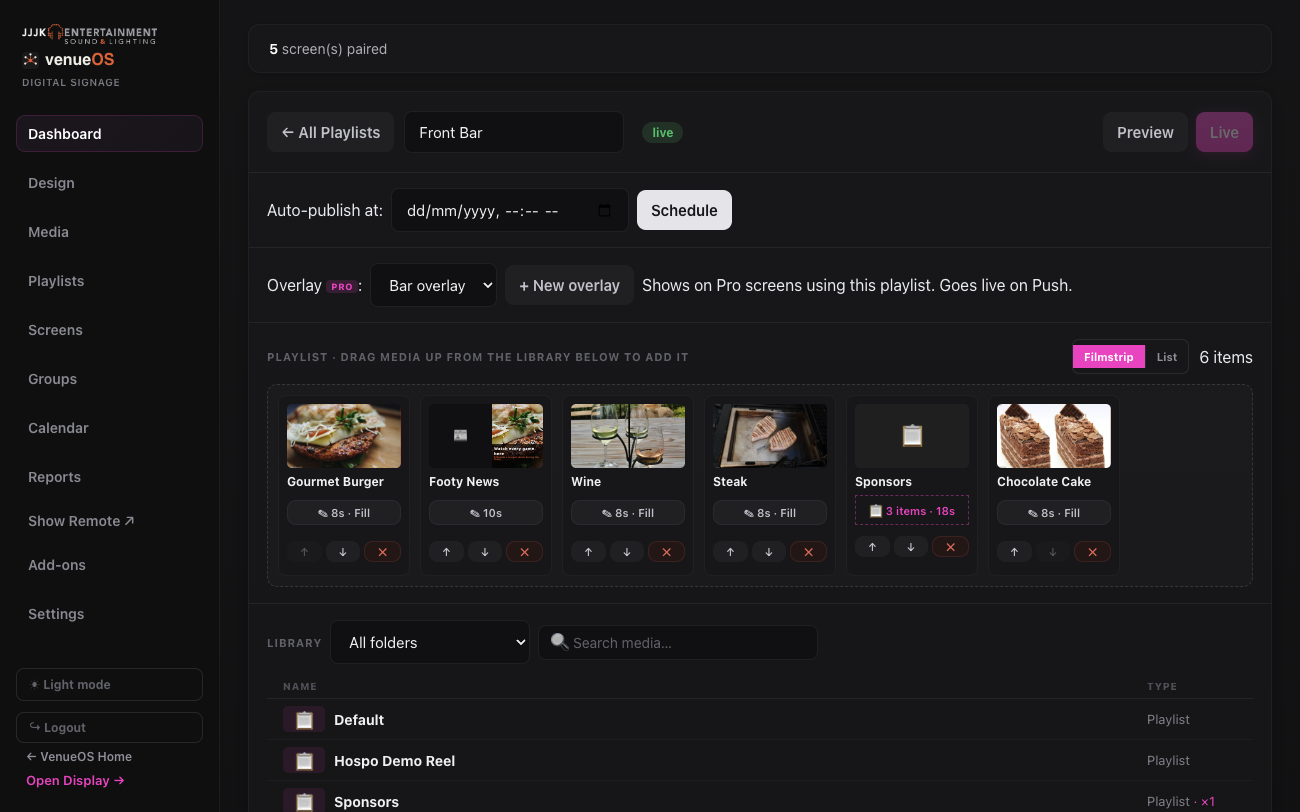
The Sponsors playlist added as one tile. Push the outer playlist
From then on it plays every slide in the shared playlist at that spot.
Update the shared one later
Change the Sponsors playlist and push it - every playlist that includes it updates, no need to touch them.
Good to know: It plays the shared playlist's live (pushed) version. VenueOS won't let a playlist end up inside itself.
Still stuck?Send us a ticket and the JJJK team will get back to you.
Submit a ticket